May 31, 2015
Google Forms is one of the versatile tools we use for a wide variety of instructional purposes. From creating survey forms to designing short formative assessment quizzes, Google Forms is definitely a life saver for teachers.With the added functionalities brought about by integrated add-ons , teachers can now perform some amazing things with their forms. Below are three examples of tools to simplify your classroom workflow.
1- Doctopus
“Doctopus gives teachers the ability to mass-copy (from a starter template), share, monitor student progress, and manage grading and feedback for student projects in Google Drive…Doctopus increases student collaboration and enables a powerful shift in teacher workflow -- scaling teachers' ability to manage and assess writing tasks and projects that motivate rich, authentic student production and collaboration (e.g. the development of core career, college, and 21st-century skills).”
2- gClassFolders
“gClassFolders (gCF) helps teachers manage digital classroom workflow when using Google Apps with their students. It does this by creating folders with specific permissions. Each Classroom will be setup with:“Assignment” folders, “Class Edit”, “Class View”, and “Teacher” folder. Once the folders are created teachers can manage students and distribute files.”
3- AutoCrat
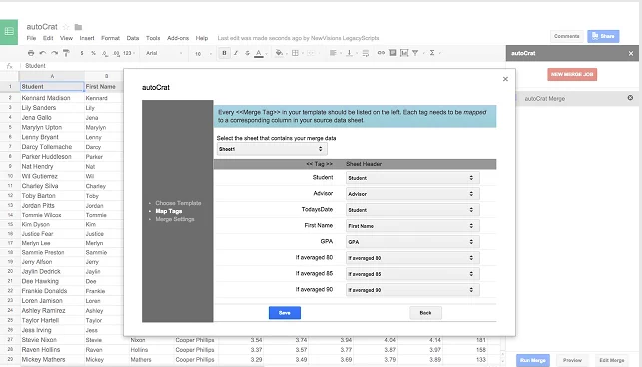
“Flexible, easy to use document merge tool that creates PDF or shared Documents from spreadsheet data….Automates the creation and sharing of personalized (e.g. merged) Google Docs or PDF email attachments from columns of data in a Google Sheet.”
Follow us on : Twitter, Facebook , Google plus, Pinterest .
Mostrando entradas con la etiqueta google forms. Mostrar todas las entradas
domingo, 31 de mayo de 2015
miércoles, 25 de febrero de 2015
7 Great Google Forms Tools for Teachers
February 25, 2015
Since its release a few months ago, add-ons store for Google Forms has several interesting tools added to it. We have gone through these apps and selected the most popular ones there. You can use these add-ons on your forms to add more features and options such as : sending custom emails based on responses, eliminate an option from a multiple choice list after user has submitted it, populate multiple choice lists and grid options from columns in any Sheet, and many more.
1- Form Notifications
This add-on allows users to create and configure email notifications that are sent when a Form receives submissions. Users can have emails sent to the creator of the Form and/or send short, customized reply emails to the Form submitter.
2- formLimiter
Close your survey automatically, after a maximum number of responses is reached, or at a date and time of your choosing.
3- Ultradox Trigger
Create custom emails, reports, invoices, newsletters, etc., based on information that people enter into your form.
4- Form Values:
Store and pull from lists that you use regularly in Forms, like a list of staff, students, rooms, resources or anything you want.
5- FormRanger
formRanger allows you to auto-populate the choices in list, multiple choice, checkbox or grid question options from columns of data in any Google Sheet or Doctopus roster. Great for ensuring form choices match values in an existing database of records, such as students, inventory items, expected attendees, workshop or session titles, etc. -- useful for then applying matching formulas such as COUNTIF, VLOOKUP, MATCH, and others.
This will eliminate options from a multiple-choice, list, or checkbox type of question. Great for signing up for time slots or having students choose topics without doubling up.
Since its release a few months ago, add-ons store for Google Forms has several interesting tools added to it. We have gone through these apps and selected the most popular ones there. You can use these add-ons on your forms to add more features and options such as : sending custom emails based on responses, eliminate an option from a multiple choice list after user has submitted it, populate multiple choice lists and grid options from columns in any Sheet, and many more.
1- Form Notifications
This add-on allows users to create and configure email notifications that are sent when a Form receives submissions. Users can have emails sent to the creator of the Form and/or send short, customized reply emails to the Form submitter.
2- formLimiter
Close your survey automatically, after a maximum number of responses is reached, or at a date and time of your choosing.
3- Ultradox Trigger
Create custom emails, reports, invoices, newsletters, etc., based on information that people enter into your form.
4- Form Values:
Store and pull from lists that you use regularly in Forms, like a list of staff, students, rooms, resources or anything you want.
5- FormRanger
formRanger allows you to auto-populate the choices in list, multiple choice, checkbox or grid question options from columns of data in any Google Sheet or Doctopus roster. Great for ensuring form choices match values in an existing database of records, such as students, inventory items, expected attendees, workshop or session titles, etc. -- useful for then applying matching formulas such as COUNTIF, VLOOKUP, MATCH, and others.
Create graphs (including plotting points), statistical displays, and write complex math directly in your Form!Create graphs and complex math directly in the sidebar and insert them as Form items.
jueves, 5 de febrero de 2015
Teacher Tip- Use Google Forms to Instantly See students Feedback
February 5, 2015
Today I am sharing with you a handy Google Sheets tip to use on the forms you share with students. This tip allow you to receive a notification email every time a student submits a form. You can select whether you want to be notified each time a change is made to the form or only when a user submits a form. Similarly, you can also choose whether you want to receive a daily digest email or an instantaneous email. In this way, you will be able instantly track all the forms submission from your students and determine who submitted what and when.
To enable this notification feature, head over to your Google form, and click on “ Tools” and select “Notification rules”
Select from the options provided in the box.
Watch this video to learn more about this tip.
Today I am sharing with you a handy Google Sheets tip to use on the forms you share with students. This tip allow you to receive a notification email every time a student submits a form. You can select whether you want to be notified each time a change is made to the form or only when a user submits a form. Similarly, you can also choose whether you want to receive a daily digest email or an instantaneous email. In this way, you will be able instantly track all the forms submission from your students and determine who submitted what and when.
To enable this notification feature, head over to your Google form, and click on “ Tools” and select “Notification rules”
Select from the options provided in the box.
Watch this video to learn more about this tip.
Suscribirse a:
Entradas (Atom)


