May 18, 2015
Here are some excellent iPad apps to enhance students creativity through digital storytelling. These are among the best apps teachers have been using with their students to create, narrate, and share stories. Using these apps students will be able to tell their own stories using a variety of multimedia materials that include: images, characters, avatars, photos, audio recordings, video clips and many more. The editing and creation functionalities differ from one app to the other but overall, the process is fairly simple and student friendly:
1- 30hands
“30hands Mobile focuses on the power of storytelling and ITERATIVE CREATIVITY(TM). Drag photos, images or video clips around the desktop into the order of the story. Next, record audio over each image. Easy editing allows students to take learning to a higher level and creates a better final video whether created by student or teacher. Finally, the presentation can be published to the Camera Roll or uploaded to a 30hands Cloud collaborative learning site.”
2- Toontastic
“Toontastic is a creative storytelling app that enables kids to draw, animate, and share their own cartoons with friends and family around the world. ..Making cartoons with Toontastic is as easy as putting on a puppet show - simply press the record button, move your characters onscreen, and tell your story. Toontastic records your animation and voice as a cartoon video to share with friends and family.”
3- ZooBurst
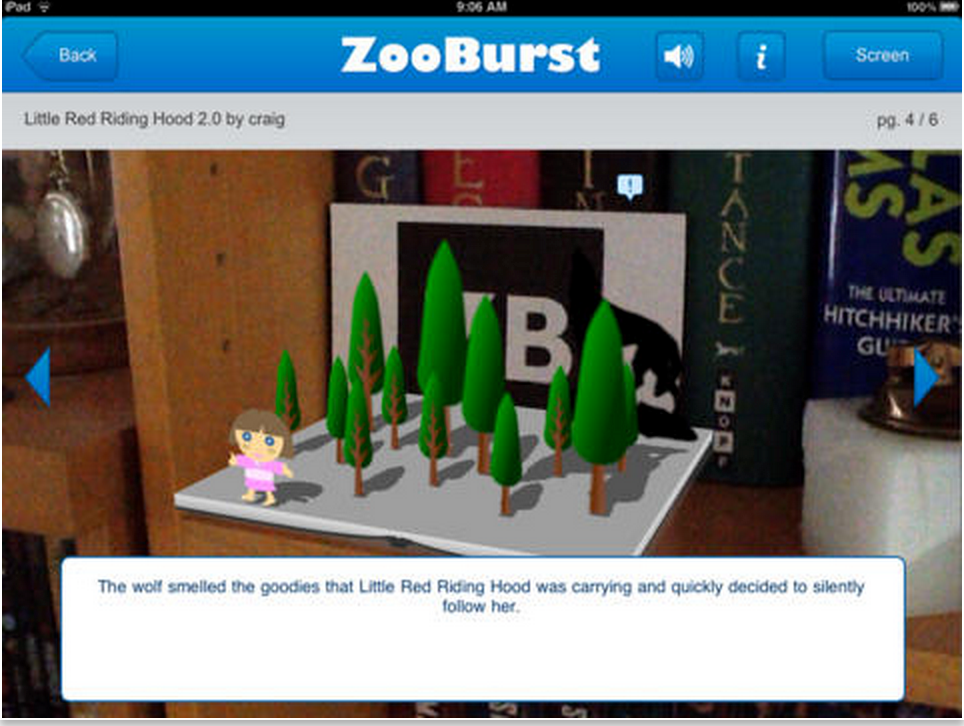
“ZooBurst is a digital storytelling tool that lets anyone easily create his or her own augmented reality 3D pop-up books. Our iPad app is designed compliment our web based storytelling community and help you view your stories “on the go.””
4- Puppet Pals HD
“Create your own unique shows with animation and audio in real time! Simply pick out your actors and backdrops, drag them on to the stage, and tap record. Your movements and audio will be recorded in real time for playback later. ”
5- Shadow Puppet Edu
“Easily create videos in the classroom! Students as young as five can make videos to tell stories, explain ideas, or document their learning. 30+ lesson ideas supporting Common Core make it easy to get started!”
6- Tellagami
“A Gami can be an exciting tweet or status update. It can be a fun way to tell a story. It can be a thank you message or a vacation postcard. It can be a birthday greeting, party invite or cool way to share photos. The possibilities are endless!”
Mostrando entradas con la etiqueta iPad digital storytelling apps. Mostrar todas las entradas
lunes, 18 de mayo de 2015
viernes, 1 de mayo de 2015
An Excellent Lesson On How Students Can Use Scratch Jr for Digital Storytelling
May 1, 2015
iPad Monthly is finally out today and we are sharing with you one excellent lesson it covered in its first edition. iPad Monthly is “a professional development [subscription-based] newsletter for teachers using iPads in the classroom”. iPad monthly is authored by Apple Distinguished Educator and inspiring keynote speaker, Paul Hamilton. The first edition of this newsletter has been released today and includes 6 lessons:
In this video tutorial, Paul explains how students can use the popular app Scratch Jr as a form of digital storytelling. The scenario selected for this tutorial involves telling a story through the movements of a cat. The storytelling starts with setting the scene by selecting a background, then kids get to explore the movements of the cat by using different blocks to control its movements. The great thing about this activity is that kids gets to learn new coding skills while being engaged in digital storytelling. Watch the video to learn more.
Follow us on : Twitter, Facebook , Google plus, Pinterest .
iPad Monthly is finally out today and we are sharing with you one excellent lesson it covered in its first edition. iPad Monthly is “a professional development [subscription-based] newsletter for teachers using iPads in the classroom”. iPad monthly is authored by Apple Distinguished Educator and inspiring keynote speaker, Paul Hamilton. The first edition of this newsletter has been released today and includes 6 lessons:
![]() |
| Source: iPad Monthly |
- Lesson 1: Create digital stories using Scratch Jr
- Lesson 2: Create Digital Math Manipulative Templates in Explain Everything by guest teacher Reshan Richards
- Lesson 3: Create a Comic Debate using Comic Life
- Lesson 4: Conduct a 2D shape investigation using the new paper and shape tools in Book Creator
- Lesson 5: Inspire Creative Writing using Crayola Color Alive by guest teacher Drew Minock
- Lesson 6: Create an interactive Narrative using The Adventure Creator
In this video tutorial, Paul explains how students can use the popular app Scratch Jr as a form of digital storytelling. The scenario selected for this tutorial involves telling a story through the movements of a cat. The storytelling starts with setting the scene by selecting a background, then kids get to explore the movements of the cat by using different blocks to control its movements. The great thing about this activity is that kids gets to learn new coding skills while being engaged in digital storytelling. Watch the video to learn more.
Follow us on : Twitter, Facebook , Google plus, Pinterest .
jueves, 2 de abril de 2015
Some of The Best Storytelling Apps for Elementary Students
April 2, 2015
The apps below are particularly useful for elementary students but they can also be used with other age groups. Elementary teachers often complain about the paucity of apps that are kids appropriate compared with apps for other age groups. So we thought it would be useful to create a section in this blog devoted entirely to apps specifically curated for elementary teachers. After we have covered math and writing apps, today’s post features some very good iPad storytelling apps to use with young kids. You can use these apps to help kids develop a wide range of basic literacy skills that include: writing, reading and speaking.
1- Story Builder
"With Story Creator you can easily create beautiful story books containing photos, videos, text, and audio all in one gorgeous collection. Story Creator truly brings your best stories to life and easily allows you to retell and share your most memorable moments."
2- Shadow Puppet Edu
"Easily create videos in the classroom! Students as young as five can make videos to tell stories, explain ideas, or document their learning. 30+ lesson ideas supporting Common Core make it easy to get started!"
3- TeleStory
"From the creators of Toontastic (iTunes Hall of Fame, NY Times "Top 10 iPad Apps"), TeleStory takes you behind the scenes to create and broadcast your own TV show! Record a music video, teleport to an alien planet, film a high-speed-chase, or perform on a reality TV show - TeleStory is a TV studio in your pocket."
4- StoryBuilder ofr iPad
"Story Builder is designed to help children accomplish the following educational goals: 1) Improve paragraph formation; 2) Improve integration of ideas; and 3) Improve higher level abstractions by inference. Extensive use of audio clips promotes improved auditory processing for special needs children with autism spectrum disorders or sensory processing disorders."
5- Our Story for iPad
"Reading, even in the digital age, is probably one of the most important skills that children acquire. It can be an important source of pleasure which also develops vital language and social skills. It is fundamental to most school activities, it can also open up new worlds and give access to the wealth of human knowledge."
The apps below are particularly useful for elementary students but they can also be used with other age groups. Elementary teachers often complain about the paucity of apps that are kids appropriate compared with apps for other age groups. So we thought it would be useful to create a section in this blog devoted entirely to apps specifically curated for elementary teachers. After we have covered math and writing apps, today’s post features some very good iPad storytelling apps to use with young kids. You can use these apps to help kids develop a wide range of basic literacy skills that include: writing, reading and speaking.
1- Story Builder
"With Story Creator you can easily create beautiful story books containing photos, videos, text, and audio all in one gorgeous collection. Story Creator truly brings your best stories to life and easily allows you to retell and share your most memorable moments."
2- Shadow Puppet Edu
"Easily create videos in the classroom! Students as young as five can make videos to tell stories, explain ideas, or document their learning. 30+ lesson ideas supporting Common Core make it easy to get started!"
3- TeleStory
"From the creators of Toontastic (iTunes Hall of Fame, NY Times "Top 10 iPad Apps"), TeleStory takes you behind the scenes to create and broadcast your own TV show! Record a music video, teleport to an alien planet, film a high-speed-chase, or perform on a reality TV show - TeleStory is a TV studio in your pocket."
4- StoryBuilder ofr iPad
"Story Builder is designed to help children accomplish the following educational goals: 1) Improve paragraph formation; 2) Improve integration of ideas; and 3) Improve higher level abstractions by inference. Extensive use of audio clips promotes improved auditory processing for special needs children with autism spectrum disorders or sensory processing disorders."
5- Our Story for iPad
"Reading, even in the digital age, is probably one of the most important skills that children acquire. It can be an important source of pleasure which also develops vital language and social skills. It is fundamental to most school activities, it can also open up new worlds and give access to the wealth of human knowledge."
domingo, 8 de febrero de 2015
New- Google Now Offers These Powerful Storytelling Apps for Free
February 9, 2015
Following the purchase of Launchpad Toys by Google, this latter has officially made the two popular educational apps Toonastic and TeleStory free for everyone. This piece of news, which I learned from Jonathan Wylie, is a great welcome for educators and teachers. The two apps are already being heavily used by teachers and we have reviewed them here in several past instances, however, now that they are free, teachers will have access to those powerful and advanced features that were available only to premium members through in-app purchase.
1- Toonastic
Toonastic is a great storytelling app that allows kids to easily draw, animate and create beautiful cartoons to share with others.”Making cartoons with Toontastic is as easy as putting on a puppet show - simply press the record button, move your characters onscreen, and tell your story. Toontastic records your animation and voice as a cartoon video to share with friends and family. “
2- TeleStory
TeleStory is another fantastic storytelling app that draws on the power of augmented reality features. It allows users to create stories using a wide variety of themes, animated scenes, 50 different digital costumes, and many special effects. Users can record or broadcast their creations by exporting them to their camera roll and then from there share them with others.
Follow us on : Twitter, Facebook , Google plus, Pinterest .
Following the purchase of Launchpad Toys by Google, this latter has officially made the two popular educational apps Toonastic and TeleStory free for everyone. This piece of news, which I learned from Jonathan Wylie, is a great welcome for educators and teachers. The two apps are already being heavily used by teachers and we have reviewed them here in several past instances, however, now that they are free, teachers will have access to those powerful and advanced features that were available only to premium members through in-app purchase.
1- Toonastic
Toonastic is a great storytelling app that allows kids to easily draw, animate and create beautiful cartoons to share with others.”Making cartoons with Toontastic is as easy as putting on a puppet show - simply press the record button, move your characters onscreen, and tell your story. Toontastic records your animation and voice as a cartoon video to share with friends and family. “
2- TeleStory
TeleStory is another fantastic storytelling app that draws on the power of augmented reality features. It allows users to create stories using a wide variety of themes, animated scenes, 50 different digital costumes, and many special effects. Users can record or broadcast their creations by exporting them to their camera roll and then from there share them with others.
Follow us on : Twitter, Facebook , Google plus, Pinterest .
Flipagram- A Great Digital Storytelling App Using Pictures and Audio
February 8, 2015
Flipagram is a cool app that allows you to create short video stories using pictures and images you have in your camera roll, albums, Facebook or Instagram. The process to create a video story using Flipagram is very simple: select your photos, add your favourite music. You can also add text to tell your story. Once done you can then share your creation with others using social media platforms or through email.
Other interesting features Flipagram provides for users include things such as set timing, cool filters, easy sharing to other apps (e.g Twitter, YouTube, Instagram..etc), cool selfie cam mode, and many more. Since the recent update to the app, Flipagram users can now :
Watch this video to learn more about Flipagram
Follow us on : Twitter, Facebook , Google plus, Pinterest .
Flipagram is a cool app that allows you to create short video stories using pictures and images you have in your camera roll, albums, Facebook or Instagram. The process to create a video story using Flipagram is very simple: select your photos, add your favourite music. You can also add text to tell your story. Once done you can then share your creation with others using social media platforms or through email.
Other interesting features Flipagram provides for users include things such as set timing, cool filters, easy sharing to other apps (e.g Twitter, YouTube, Instagram..etc), cool selfie cam mode, and many more. Since the recent update to the app, Flipagram users can now :
- Join the creative community of photo-video storytellers on Flipagram
- Tell great stories with your photos and favorite music
- Follow and interact with friends and interesting people
- Get likes and comments on your creations
- Explore users, #hashtags, and editor’s picks
- Find your Facebook and Instagram friends
- Control the privacy of each of your flipagrams
Watch this video to learn more about Flipagram
Follow us on : Twitter, Facebook , Google plus, Pinterest .
Suscribirse a:
Entradas (Atom)


