x

martes, 24 de febrero de 2015

The Best 8 Web Tools for Doing Formative Assessment in Class

February 25, 2015
Formative assessment, as we have agreed elsewhere, is assessment for learning which is completely different from summative assessment, which is assessment of learning. The insights gained from formative assessments are usually used to decide on the next instructional steps and also inform teachers as to the additional opportunities needed to ensure students' success. Examples of formative assessment include: assigning projects and performances, giving writing assignments, and asking questions.


There are a variety of ways to do formative assessment in class and this post features some interesting examples of formative assessment techniques. You can also draw on technology to formatively assess your students and gather feedback from them. Here are some of the best web tools to use for in-class formative assessment, for more tools you can check this page.

1- Today’s Meet
This is an excellent tool to use with students to gather instant feedback on their learning or poll them on matters related to what you teach them. Today’s Meet allows you to create rooms and invite students to join them with no sign up. It is also a very good backchannel platform where students can engage in fruitful discussions and conversations.

2- Socrative
Socrative is one of our favourite tools for getting feedback from students. Teachers can use the different question types provided by Socrative to poll their students and garner their feedback in a variety of formats using both smartphones or computers.

3- Infuse Learning

Infuse Learning provides a platform by which teachers can seamlessly engage every student on any device. Make informed decisions at the point of instruction with real-time, student feedback.

4- iClicker

iClicker is a powerful formative assessment tool and intuitive student response system that allows for dynamic student-teacher interaction. Here is how it works: Instructors ask questions through any presentation application; students answer questions with a remote or smart device; instructors display results in real-time and
record responses

5- Poll Everywhere

Poll Everywhere is another powerful web tool to collect feedback from your students. It  provides you with a variety of templates and feedback forms to choose from. Students answer in real time using mobile phones, Twitter, or web browsers. The neat feature I like the most about PollEverywhere is that it lets you see your response live on the web or in a PowerPoint or Keynote presentation.

6- Mentimeter

Mentimeter allows you to use mobile phones or tablets to vote on any question you specify. This is how it works:
  • Create your question
  • Let your students vote using their mobile phones or tablets
  • Show the result to your audience in real-time

Geddit is another interesting tool that you can use in class to gather instance feedback about your students learning in real-time. You can use both multiple choice or short answer responses to check for evidence of your students understanding.

Plickers lets you poll your class for free, without the need for student devices. Just give each student a card (a "paper clicker"), and use your iPhone to scan them to do instant checks-for-understanding, exit tickets, and impromptu polls. Best of all, your data is automatically saved, student-by-student, at plickers.com.

Two New Google Drive Updates You Should Know About

February 24, 2015
Here is a very interesting set of updates added today to Google Docs. These updates are especially helpful for student researchers and teachers who prefer to use Google Docs to write long research papers and theses.  Google Docs now allows you to customize how the headers and footers appear on the first page of your documents.With this update, you will be able to have a specific header and footer for the first page of your documents. "After inserting a header or footer in your document you’ll see a new checkbox--just tick it and you’ll be able to set a different header and footer on the first page."


Another important update is the addition of a menu for  inserting page numbers which lets you customize how and where you start your page numbers.

Courtesy of Google for Education

A Beautiful Visual Featuring The 7 Cs of Effective Communication

February 24, 2015
Following the post we shared here a few weeks ago featuring some useful resources to help teachers and educators master the art of presenting, somebody sent us this beautiful visual which ties in with the theme of that post. 7 Cs of Effective Communication is a work from Brainy Quote and Evan Carmichael. The visual  outlines some interesting strategies to keep in mind when delivering a talk, facing an audience, or conversing with others. Communicative competence is at the core of the skills we need as teachers and it is also the key to a better mutual understanding. We are hoping the visual will provide you with a refresher on some of the effective ways to maintain effective communication. Have a look and share with us what you think of this work.

Check the original graphic from this page.

communication tips


lunes, 23 de febrero de 2015

10 of The Best Chrome Apps for Math Teachers

February 23, 2015
Here is what we have been working on over the last weekend. This is a list that comprises some of the best math apps and extensions in Chrome store. We have literally gone through hundreds of apps to finally decide on the apps that would make the cut.These extensions are meant to help kids develop math skills through a wide variety of exercises, activities, games, interactive simulations and many more. Some of these apps are integrated with Google Drive and are also available for  iPad, Android, and Chromebooks.

1- GeoGebra

GeoGebra (www.geogebra.org) is free dynamic mathematics software for all levels of education that brings together geometry, algebra, spreadsheets, graphing, statistics and calculus in one easy-to-use package. Interactive learning, teaching and evaluation resources created with GeoGebra can be shared and used by everyone at tube.geogebra.org.

2- Desmos Graphing Calculator


Explore math with Desmos! Plot functions, create tables, add sliders, animate your graphs, and more -- all for free.

3- Math Arcade Games


Improve your math skills and have arcade style fun at the same time.  Blast your way through wave after wave of attacking alien space ships.

4- Graph.tk


Graph.tk is an online and open-source graphing utility.It's very easy to use. Use the "+" button to create a new equation. Use "/" for fractions, "^" for exponentials, and "*" for multiplication.

5- Buzz Math


Buzz Math is a great app for personalized middle school math practice. it’s engaging thousands of students , teachers and families by empowering and challenging them.

6- MathBoard Addition


 MathBoard Addition is appropriate for all ages from kindergarten to elementary school where learning math can be a challenge. You can control the range of numbers you want to work with, the number of questions you want to answer and even assign a time limit per quiz.

7- Math Mahjong

Begin with Mathjong Basic and learn the fundamentals, and then there are four more levels after that, each more challenging than the last.

8- Monster Math Flash Card


Monster Math Flash Cards for kids is a fun way for kids to learn addition, subtraction, multiplication with an array of cute animated monsters. With the Monster Math Flash Cards app, you can choose from a range of numbers, which is great for kids who are having trouble with certain math facts. Each card contains an animated monster that will entertain kids while they practice their math facts

9- Popular math


Mathground is a web site like a math library including everything about mathematics. Kids to university students, even teachers find useful and supplementary articles, math videos and other educational materials.

10- ADDieMath Math

ADDieMath is a simple and fun tool that kids can use to learn and master ADDition, subtraction, multiplication and division fact tables. ADDieMath provides the challenge of timed problem solving, the tracking of learning progress, and the flexibility of various levels and operations!

Excellent Free Resources from Google to Teach Kids Coding and Computer Science

February 23, 2015
Google Computer Science First is a free program launched by Google in 2013 to help students enhance their computer science education through a variety of after-school, in-school, and summer programs. All clubs are run by teachers and volunteers. The materials provided by Google CS First are free and available online and each of these materials include lesson plans to help you use them with your students.  These materials include:

1- Music and Sound

Play musical notes, create a music video, and build an interactive music display. Learn how programming is used to create music. Check out lesson plans.

2- Fashion and Design


Learn how computer science and technology are used in the fashion industry while building fashion-themed programs, like: a fashion walk, a stylist tool, and a pattern maker. Check out lesson plans.

3- Storytelling


Use computer science to tell fun and interactive stories. Storytelling emphasizes creativity, with club members telling a unique story each day. Check out lesson plans.

4- Art


Create animations, interactive artwork, photograph filters, and other exciting, artistic projects. Check out lesson plans.

5- Friends


Create projects for a friend! Students are encouraged to sign up with a friend or make a new friend in the club! Projects include things like: telling the story of how the friendship started, making a cooperative game and imagining a company together. Check out lesson plans.

6- Game Design


Learn basic video game coding concepts by making different types of games, like: racing, platform, launching and more! Check out lesson plans.

No computer science experience is necessary to host or volunteer. CS First provides all the training and materials you need to successfully run and lead a CS First club. All training and materials are free and available online. If you are hosting a club in the United States, you can also request materials at no cost to you. Click here to get started.


 Follow us on : Twitter, Facebook , Google plus, Pinterest .

Google Released A New Service Called YouTube Kids

February 23, 2015
Google released today a new service called YouTube Kids which is ‘a new family-friendly app that makes it easy for kids to explore a vast selection of videos on any topic.’ YouTube Kids features popular children’s programming, plus kid-friendly content from filmmakers, teachers, and creators all around the world. YouTube Kids apps are available for both Android and iOS.


This new app provides young learners with a variety of kids-appropriate channels and playlists including: Sesame Street, Thomas & Friends, and Dreamworks, online hits like Mother Goose Club, TuTiTu, and Super Simple Songs, plus anything else they’re into — music, gaming, science, crafts, and more.

YouTube Kids also provides parents with a set of interesting features to allow them to oversee how their kids are using the app. For instance there is a timer that parents can set to let their kids know when it’s time to stop watching. Watch the video below to learn more about YouTube Kids.


27 Reflection Strategies to Improve Your Teaching

February 23, 2015
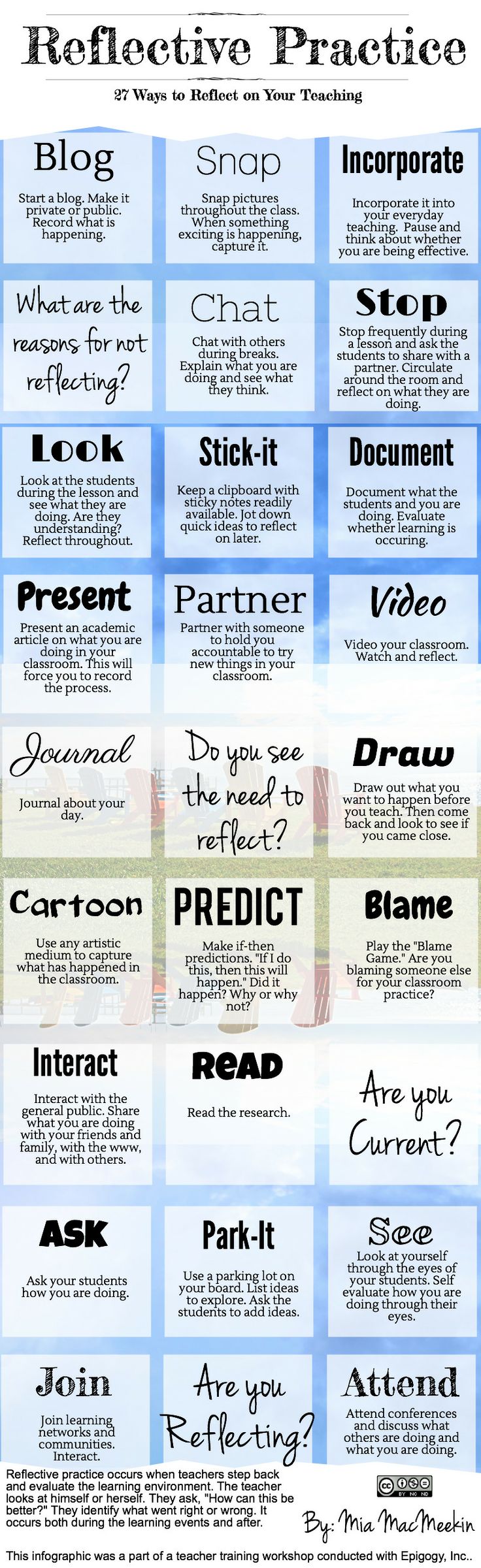
Reflection and reflexivity are two meta-cognitive processes that we constantly need to exercise in order to guarantee an effective and healthy professional and also emotional growth. Unless you take a pause and think deeply about what you are doing and how you are doing it, you will never get to learn about your weaknesses and strengths. You won’t be able to stop navel-gazing and see the whole picture from an onlooker perspective.

As a teacher, there are several ways and strategies to employ to cultivate a reflective mindset and enhance your self-evaluative practices. Some of these strategies are beautifully captured in the visual below created by Mia MacMeekin from Anethicalisland. We invite you to go through them and share with us what you think of this work. Enjoy

27 Ways to Reflect on Your Teaching  Follow us on : Twitter, Facebook , Google plus, Pinterest .